

Every entrance.
Under your control.
Scan QR codes, barcodes, Data Matrix and more. Set your rules, track staff performance and follow every entrance live.

Your ticket seller stays.
Your entry gets smarter.
Import CSV files, sync with supported ticket sellers via API or connect your own workflow. Bring online sales, guest lists and door tickets into one event.
Multiple sources. One event.
Keep each ticket’s source and type visible to your team.
Find the guest in front of you.
Search tickets and guest records instead of juggling separate lists.
Entry control is the product.
You don’t have to sell a single ticket with us.
Every entrance, one ticket list.
Your door policy.
Built into every check.
Decide which tickets can be checked, where and when. Assign your team the access their role needs.
Set the right entry window.
- Regular
- 22:00 to 04:00
- VIP
- 22:00 to 06:00
- Guest list
- Until 01:00
By event date, ticket type and ticket source.
Give every role its access.
Full-access validator
Check all ticket types and sources.
Restricted validator
Check only the ticket types and sources assigned to you.
Configure the event and staff centrally.
Regular + VIP · Assigned ticket sources
VIP + guest list · Assigned ticket sources
Festivals
Multiple sellers, dates and entrances.
Clubs
Promoter, artist and VIP guest lists.
Venues
Box office and online tickets together.
Your event in hand.
Your team in view.
Stay in control while you move around the event. Follow arrivals, check staff activity and investigate every scan, all from your phone.
See the entrance as it happens.
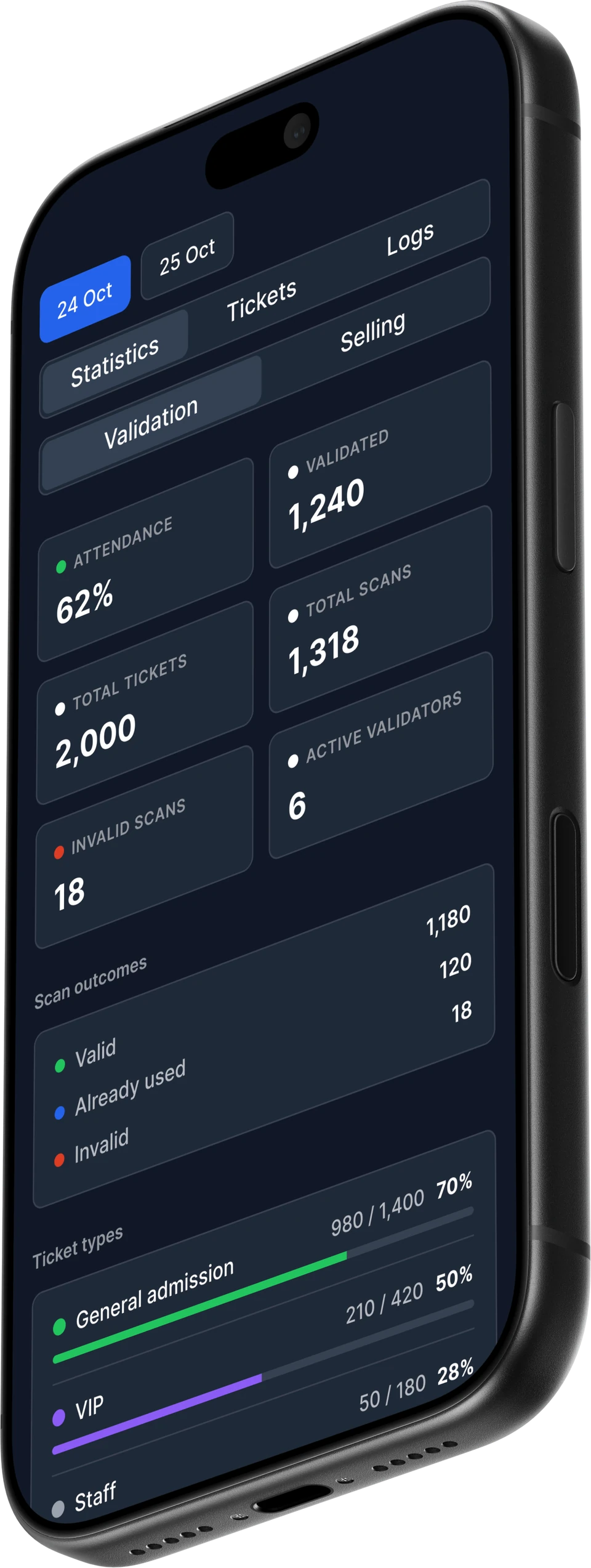
Follow attendance, scan outcomes, ticket types and active validators for each event date.
Understand every scan.
Search tickets and logs. See the result, ticket holder, validator, scanning method and exact time.
Get the alerts that matter.
Choose push alerts for first scans, queue pressure, inactivity and offline readiness.
Using on-site POS? Follow revenue, ticket sales and seller activity in the same app.
Validator performance
Northline Festival · Main gate + VIP
| Validator | Total scans | Valid | Invalid | Duplicates | Invalid rate | Last scan |
|---|---|---|---|---|---|---|
| Alex MorganMain gate | 2,854 | 2,808 | 46 | 29 | 1.6% | 22:45:12 |
| Jordan LeeMain gate | 2,258 | 2,215 | 43 | 28 | 1.9% | 22:45:09 |
| Casey TaylorVIP entrance | 2,036 | 1,997 | 39 | 17 | 1.9% | 22:44:58 |
46 invalid · 29 duplicates · 22:45:12
43 invalid · 28 duplicates · 22:45:09
39 invalid · 17 duplicates · 22:44:58
Recent validation logs
See the staff member behind each check.
Professional scanning.
Across ticket formats.
Scan linear and 2D codes from the ticket sources you already use. Bring printed tickets and mobile screens into one entry workflow, shaped by 10+ years in the event industry.
Scan with the phones you have.
Turn iOS and Android phones into multi-format ticket validators.
Scan, search or enter manually.
Read supported linear and 2D codes, look up a guest or enter the ticket details manually.
Know who is at the door.
See the guest, ticket ID and category when a ticket is checked.
Spot repeat scans.
Get an “Already validated” result and check the ticket’s scan history.
Know why a check failed.
Identify tickets not found, restricted types and checks outside entry hours.
Keep the record behind the scan.
Review validation logs, scan times and the staff activity behind each check.
The entry app. For iOS and Android.
Scan tickets, find guests and keep every entrance moving from your team’s phones.


Weak signal.
Keep entry moving.
Download the assigned ticket lists before the event. Validate locally when the connection drops, then sync scans when you reconnect.
- 01Prepare your event
- 02Download assigned tickets
- 03Validate offline
- 04Reconnect and sync
See the arrivals.
Understand every scan.
Follow attendance and validation activity live. Review rejected scans, compare ticket categories and see how your team is performing.
Validation statistics
Live eventValidations over time
Know why a scan was rejected.
Valid checks by validatorValid checks by entrance team
Attendance by ticket type
See how different ticket categories are arriving.
Scan timelines and issue reasons
Understand when guests arrive and why tickets are rejected.
Your team’s activity
Review validation counts and the people behind the scans.
Walk-up guests?
You’re ready for them.
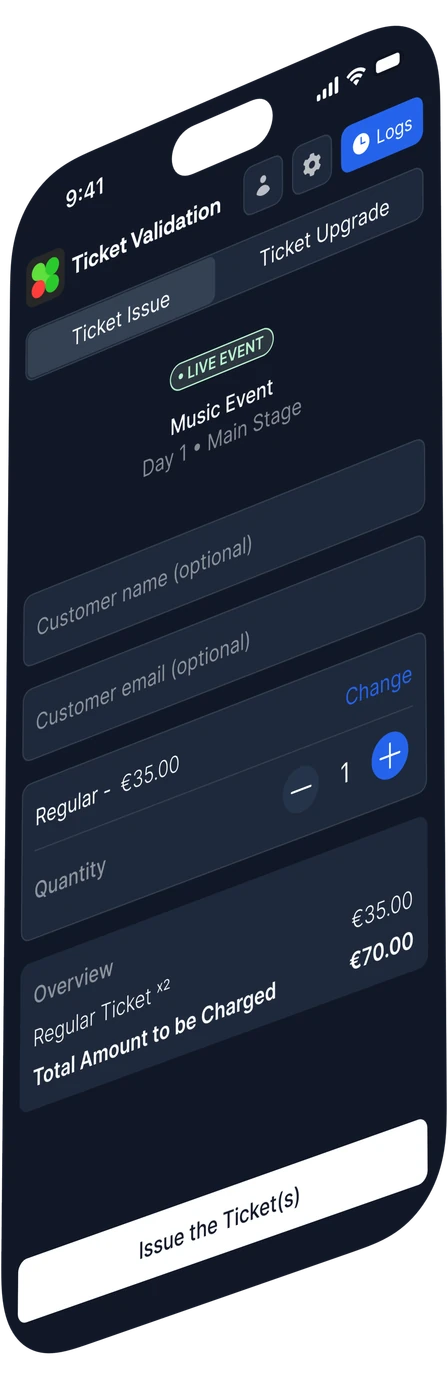
Add on-site POS to sell, issue and upgrade tickets from a phone. Keep door sales and entry records in the same event.

Entry control works on its own. Ticket sales are your choice.
Explore ticket salesYour ticket seller. Your entry control.
Bring your tickets. Set your rules. Run the door.