

Your ticket sales.
On your terms.
Sell online and on-site. Build your shop, plan your releases and follow every sale, with payments to your own account.

Online orders
Every order, in one place.

 Search by order, buyer or email

Your shop. Your releases.
Branded checkout, ticket types and timed sales phases.
Your on-site POS.
Issue and upgrade tickets from your team’s phones.
Detailed sales statistics.
Revenue, allocations, phases, channels and orders.
Your brand.
Right through checkout.
Choose your colors, font and corners. Share your sales page or embed checkout on your own website.

Your ticket price.
Yours to keep.
Connect your own Stripe account and receive the full ticket price. We take care of Stripe fees. We never hold your ticket revenue.

€30 ticket price. €30 for you.
Bank payout timing follows your Stripe payout schedule.Ready for the rush.
Built on scalable AWS infrastructure for high-demand ticket releases. Capacity grows with demand, so you can sell large volumes of tickets in a short time.
Need higher capacity? Talk to us →
Up to1,000tickets per second
ON AWSMake every release
count.
Set the price and quantity for each phase. Releases advance automatically when a phase ends or sells out.
Different tickets. Different days.
Offer single-day tickets or festival passes, with separate allocations for each ticket type.
Early Bird
Sold outMain Release
ActiveFinal Release
UpcomingNext phase starts when the current phase ends or sells out.
Your campaigns.
Connected to ticket sales.
Just add your tracking ID. No installation code needed.

Google tag
Google Analytics & Ads

Meta Pixel
Facebook & Instagram

TikTok Pixel
TikTok campaigns
Your on-site POS.
Ready for the doors.
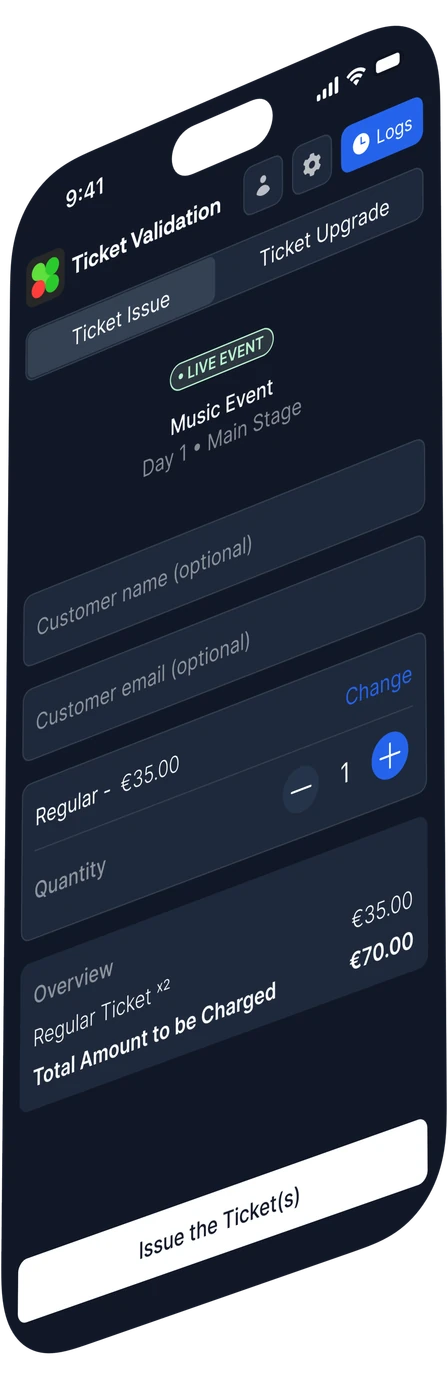
Keep selling at the venue. Choose the ticket type and quantity, review the total and issue tickets from a phone.
Issue tickets on the spot.
Choose the right ticket and quantity for the customer in front of you.
Handle ticket upgrades.
Keep ticket issuing and upgrades in the same on-site tool.
Customer details and event logs.

Your sales.
The full picture.
Know what sold, what remains and how each release performed. Follow revenue, compare sales channels and get into the orders behind the numbers.
Sales overview

Online sales
Last 30 daysTickets by type
Compare your online sales channels.
Sales page or embedded checkout. Day tickets or festival passes. Filter by period, validity and ticket type.
Get into the orders behind the numbers.
Track paid, pending, failed and refunded orders. Review gross sales, refunds, net revenue and fees, then export CSV.
Set the goal.
Define the limits.
Choose an optional revenue goal and review suggested target prices. Set a minimum and maximum for every ticket type.
Prices adjust gradually as time and sales progress, within the limits you set.
Review suggested target prices before applying.

Illustrative path. Slow sales hold prices steady.
Your next event. Your own ticketing.
From the first sale to the final scan.